
Why every creator should have a free storefront (and how to price what's on it)
"DM me for rates" and a PDF media kit can slow deals down and often leave no record of what your posts drove. Why a public, bookable rate card works better, what to put on it, how to price sponsored posts on YouTube, newsletters, LinkedIn, podcasts and short video, and how to set one up.
A lot of creators sell sponsorships one of two ways. The bio says “DM me for rates”, or there’s a media kit PDF that goes out when a brand asks. Both work well enough that it’s easy not to question them. Both can also slow deals down, and unless someone sets up tracking, neither leaves you with a record of what your work did for the brand.
A storefront is the alternative: a public page that lists what you sell to brands, what each thing costs, and a button to request it. This post makes the case for having one, then gets into the harder part, which is how to price what goes on it.
What “DM me for rates” costs you
It’s slow. A lot of deals start with the same round trip. The brand asks what you charge, you send a PDF or a number, they ask what’s included, you explain, and sometimes they come back with a budget that doesn’t match. A week can go by before anyone talks about dates. Meanwhile, a marketer with a launch date can compare creators whose prices are already on a page in an afternoon.
It’s opaque, in both directions. You don’t know what the brand would have paid, and the brand doesn’t know what you charge until it asks. Each negotiation starts from zero, and the price depends on who asked and how the conversation went. If you dislike negotiating, it’s tempting to quote low just to get it over with.
The results often go unrecorded. A deal done over DM usually ends with a post and an invoice. Unless someone sets up tracking and shares the numbers afterwards, you don’t learn what the post drove, so your next pitch leans on audience numbers rather than results.
A PDF media kit fixes part of the first problem, because at least the prices are written down. But it’s out of date as soon as your numbers move, a brand usually can’t book straight from it, and it ends up in someone’s downloads folder. It’s a document you send, not a page brands can find.
What a good rate card includes
A rate card answers the three questions a brand has before it books: what can I buy, what does it cost, and is this audience the one I want to reach.
Organise it by channel
Brands buy by channel. A team with budget for YouTube wants to see your YouTube offer without scrolling past your podcast to find it. For each channel, give:
- The handle and a link, so they can look at your work
- The audience size, and which number it is (subscribers, median views, opens, downloads)
- How often you publish
- A sentence or two on what the channel covers and who it’s for
List formats, not “a sponsored post”
Each package should be one concrete thing a brand can buy. The common formats by channel:
- YouTube: an integrated sponsorship (a sponsor segment inside a regular video), a dedicated video about the product, a Short
- Newsletter: a primary sponsor slot, a secondary or classified slot, a dedicated send
- LinkedIn: a sponsored post, a carousel
- Podcast: a host-read pre-roll or mid-roll, a sponsored episode
- Short video: a TikTok, Reel or Short, alone or as a set
- Across channels: a launch bundle, a workshop, a review that runs on your video and your newsletter in the same week
In each description, say what the brand gets: the format and length, where the link goes, when it can run, and anything else that changes the price. That includes whether the brand approves a script first, how many revisions are included, whether the brand can reuse your content in its own ads and for how long, and whether you’ll turn down its competitors for a while. Price those last two separately, because they cost you something beyond the post.
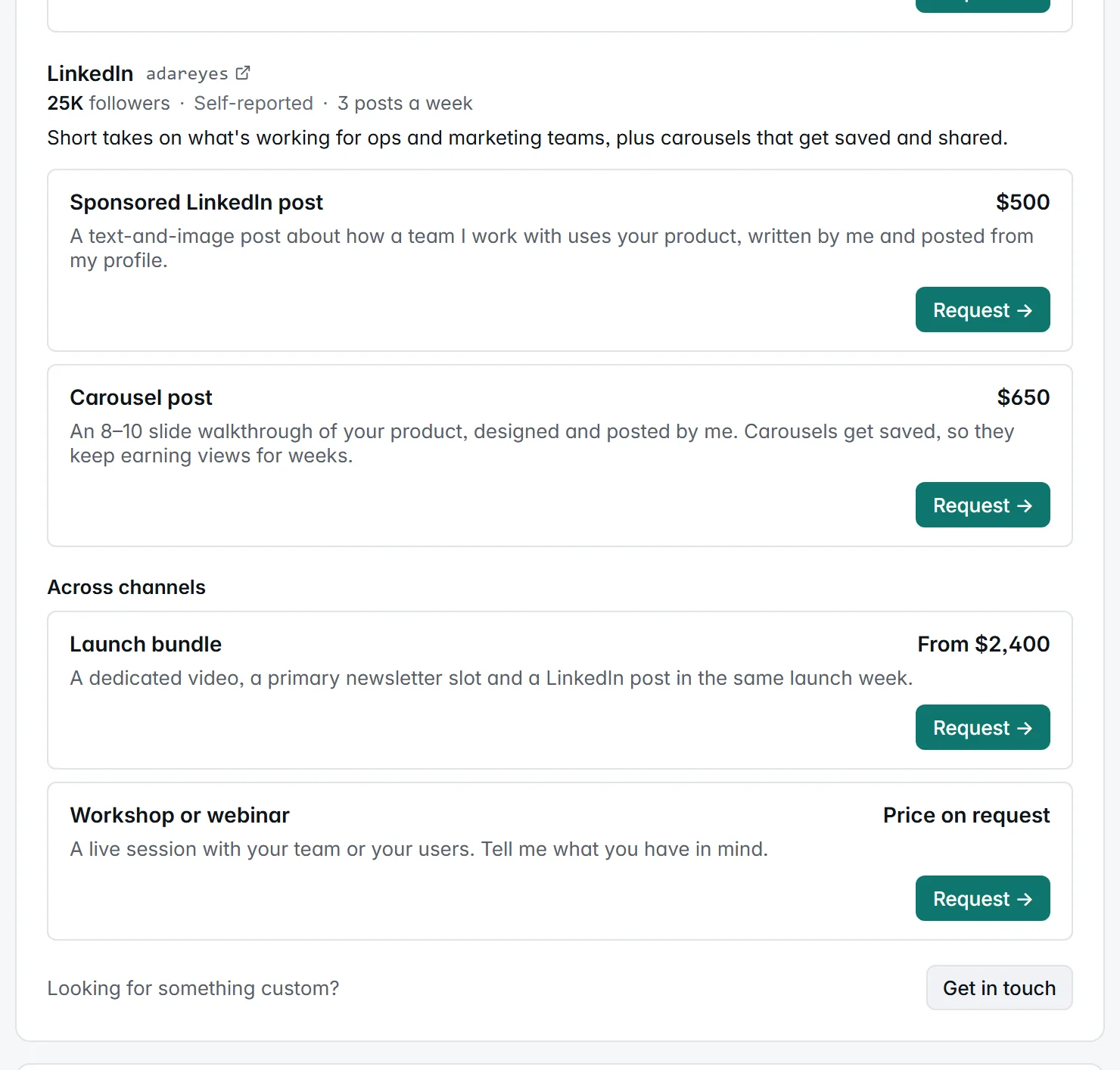
Choose fixed, “From”, or on request
- Fixed for formats you deliver the same way every time: a newsletter slot, a LinkedIn post, a Short. There’s nothing to ask before booking, so these are the easiest packages to say yes to.
- From for formats whose scope varies: a dedicated video, a bundle, a series. It sets your floor and tells the brand where the conversation starts.
- On request for work where any number would mislead, like a workshop, a long-term ambassador deal or broad usage rights. Use it sparingly. A rate card where everything is “on request” is “DM me for rates” with extra steps.
Two more habits help. Price in the currency your buyers think in: if most brands that book you are in the UK, a price in pounds saves them a conversion and you a conversation. (On an OpenPartner storefront, each package can have its own currency, from a choice of ten.) And keep the card current. Update a price when the number behind it moves, not once a year.
How to price what’s on it
First, a warning about the numbers. Public data on creator rates is thin. Most of it is list prices that creators publish, surveys of what creators say they charge, or one marketplace’s own deals, and the niche you’re in moves the price a lot. Use the figures below to check that your price is in a sensible range, not as a price list. Each one says where it comes from and when.
What each channel is priced on
A lot of sponsorship pricing works like CPM: a price per 1,000 of something you can count. What gets counted depends on the channel:
- YouTube: views, usually the median views per video across your recent uploads
- Newsletters: usually compared per 1,000 subscribers, which measures list size; ad networks pay per 1,000 unique opens or per click instead
- Podcasts: downloads per episode in its first 30 days
- LinkedIn and short video: usually a flat fee per post, and the public figures are broken down by follower count
Where a CPM applies, the arithmetic is the same: take your number, divide by 1,000, and multiply by the rate.
YouTube
YouTube sponsorships are usually priced on views, not subscribers. A common method, used in 1of10’s guide (August 2026), is the median views of your last 10 videos, times a CPM for your niche, plus your production cost, as a floor.
For what brands actually pay, there’s Agentio’s 2026 playbook (January 2026), drawn from more than 10,000 YouTube integrations run through Agentio. It groups channels by their average views per video in each video’s first 30 days, over seven months, and reports the average CPM for each group:
- Under 50,000 views per video: $51 per 1,000 views
- 50,000 to under 300,000: $28
- 300,000 or more: $22
Smaller channels get a higher rate per 1,000, a pattern you’ll see in newsletters too. Agentio also recommends that brands pay on the views a video is expected to get in its first 30 days, so if your analytics can show views at 30 days, quote those rather than lifetime totals.
Niche moves the rate a lot. 1of10’s ranges, compiled from publicly reported creator rates rather than closed deals, run from $8 to $15 per 1,000 views for entertainment and vlogs, up to $30 to $50 for B2B, SaaS and tech, and $35 to $50 or more for finance.
Those rates are for an integration, a sponsor segment inside a regular video. Other formats scale from there:
- Dedicated video: in Aspire’s survey of about 1,200 creators (June 2026), integrations came in at roughly 50 to 60% of the dedicated video rate, which puts a dedicated video at about 1.7 to 2 times an integration. 1of10 suggests two to four times.
- Sponsored Short: 1of10 puts it at a quarter to half of an integration.
A worked example: your recent videos get about 12,000 views each in their first 30 days, and you cover B2B software. At $30 to $50 per 1,000 views, the view-based part of an integration comes to $360 to $600, before any production cost you add. For comparison, Agentio’s $51 average for channels under 50,000 views per video would give $612. A dedicated video at roughly twice the integration price or more is a good candidate for a “From” price, and a Short, at a quarter to half, would come to $90 to $300 on the same basis.
Newsletters
For list prices, there’s Book a Sponsor’s reading of the advertised prices of 321 newsletters on 29 September 2026. It only includes newsletters that publish a main-slot price and list at least 500 subscribers, and counts each one at its cheapest main slot. The median price for that slot, by list size:
- Under 5,000 subscribers: $150, or about $70 per 1,000 subscribers
- 5,000 to 19,999: $310, about $36 per 1,000
- 20,000 to 49,999: $520, about $19 per 1,000
- 50,000 to 99,999: $700, about $11 per 1,000
- 100,000 or more: $1,300, about $7 per 1,000
These are list prices, not closed deals, and most of them come from Passionfroot storefronts. Newsletters that only quote on request aren’t in the sample, and the two largest bands hold about 40 newsletters each, so treat those medians as rough. The pattern is the useful part: the price per 1,000 subscribers falls as a list grows, so a small newsletter can charge a higher rate per reader than a big one.
Niche matters at least as much. Paved’s marketplace data for the past twelve months, as reported by PPC Land in August 2026, put the average at $18.47 per 1,000 subscribers for HR newsletters, $13.88 for marketing and $13.28 for startups, against $4.76 for tech and $1.22 for lifestyle. Paved’s averages sit well below Book a Sponsor’s list prices, and the two measure different things, so use Paved for the gap between niches rather than as a rate. If your readers are professionals with a budget to spend, like HR or marketing teams or founders, price toward the top of the range.
Price a secondary slot or a classified below your main slot, and a dedicated send above it, since a dedicated send is the whole issue. If you also run ads through a network like beehiiv’s, those pay per 1,000 unique opens or per click, on terms set campaign by campaign (beehiiv, updated October 2026). They aren’t a guide to what a slot you sell directly is worth.
We didn’t find a large public dataset for LinkedIn. The two sources we used disagree, partly because they cover creators of different sizes:
- Favikon (August 2026) puts the median paid per sponsored post at $798 across 135 completed client deals, rising to about $2,000 for creators above 100,000 followers. In a separate set of 136 LinkedIn creators, roughly 81% charged between $200 and $2,000 a post.
- Naano (August 2026) reports much lower medians from 300 bookings made through Naano between June and August 2026: €84 a post for creators under 5,000 followers, €180 at 5,000 to 10,000, and €300 at 10,000 to 25,000.
Both report prices as a flat fee per post, and on Naano each creator sets their own. Favikon’s view is that follower count sets a floor for the fee rather than the fee itself, and it also describes a second method: a CPM on your average impressions per post. If you know your average impressions, they’re a better anchor than followers, because they’re what the brand actually gets.
Podcasts
Podcast ads are priced as a CPM on downloads per episode, usually counted over the first 30 days. The Libsyn Ads rate guide (formerly AdvertiseCast; the page shows 2026 but no other date) lists host-read ads at $18 to $22 CPM for a 30-second spot and $24 to $26 for 60 seconds, with business shows at $30 and technology at $26. Acast’s guide (dated November 2023, so older) puts host-read ads at $25 to $40 CPM, and $40 or more for business, finance and B2B shows.
So a show averaging 5,000 downloads per episode in its first 30 days, at $25 CPM, would price a 60-second host-read mid-roll around $125. A sponsored episode is a different product, closer to a dedicated video, and belongs under “From”.
Short video: TikTok, Reels and Shorts
The public figures for short-form video are flat fees per post, broken down by follower tier, rather than CPMs. Two recent sources:
- Collabstr’s 2026 report covers 21,000 collaborations on its marketplace in 2025, where most deals are small: 80% cost under $300. Brands paid an average of $193 per Instagram collaboration and $186 per TikTok one, against average asking prices of $214 and $182. These are per-platform averages, not broken out by format, so read them as a rough guide rather than a Reel rate.
- Aspire’s survey of about 1,200 creators (June 2026) found a median of $150 for a TikTok video in its smallest (nano) tier, rising to $2,250 in its macro tier, with TikTok rates roughly 40 to 50% below Instagram Reel rates in nearly every tier. Its Instagram figures put the nano median for a Reel at $250, with the middle half of nano creators charging between $150 and $400.
For YouTube Shorts, see the multiplier above. Because short-form is priced per post, it bundles well: three posts over a month, or a short cut of a longer sponsored video, at one price. And if a brand wants to run your video as an ad from its own account, that’s usage rights, so price it separately.
Turning this into your prices
- Find your number for each channel, in the same unit as the rates you’ll use: views per video (the median across your last 10, or views at 30 days if you have them), newsletter subscribers (the newsletter figures above are per 1,000 subscribers, not opens), downloads per episode in the first 30 days, or average impressions per LinkedIn post.
- Pick a rate from the ranges above. Start in the middle. Go up for a B2B or finance audience, or for more work: a dedicated piece, script approval, usage rights. Go down for a broad entertainment audience.
- Do the arithmetic and round it to a clean number. Use “From” wherever the scope can grow.
- Check it after every few deals. If every brand accepts your first number without a question, raise it for the next one. If nobody books, look at your package descriptions before you cut the price.
Verified numbers beat self-reported ones
Every price on your card rests on a number: views, opens, downloads. A brand deciding whether your price is fair checks it against that number, so the number has to be believable.
Self-reported numbers aren’t worthless, but a brand has to take them on trust or ask you for proof. A follower count can include accounts that stopped logging in years ago, and a screenshot shows whichever week you chose. Verified numbers come from the platform, so there’s less to take on trust.
On an OpenPartner storefront, a verified YouTube channel shows its subscriber count and median views per video, synced from YouTube. Other counts are labelled Self-reported, so brands can see which is which at a glance.
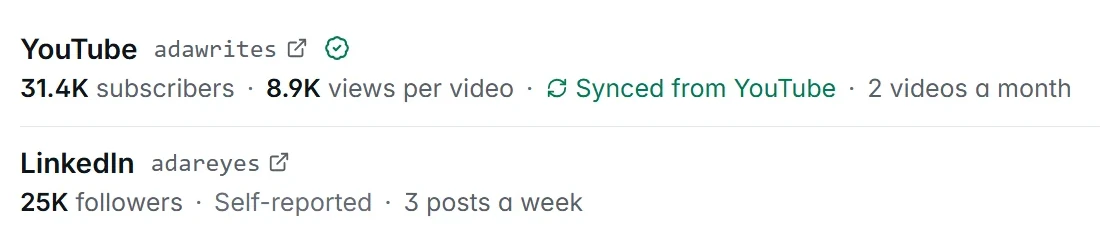
Median views is a fairer YouTube number to price on than an average, because one video that took off moves an average a long way and a median hardly at all.
For channels that aren’t verified:
- Name the metric and the period. “Average unique opens over the last 90 days” is believable. “Highly engaged audience” isn’t. Put it in the channel’s pitch.
- Use the conservative number. If a brand pays for your best month and gets a normal one, the post looks like it underdelivered.
- Keep a dated screenshot ready for the brands that ask.
Often the most convincing number isn’t an audience stat at all. It’s what your last sponsored post did for the brand that bought it, and that’s where a tracked link comes in.
Flat fee plus a tracked link: get paid for the long tail
A flat fee is fixed when you agree the deal, however the post performs afterwards. A lot of sponsored content keeps working long after it goes up: a YouTube review that ranks in search, a newsletter issue in the archive, a carousel people saved.
Pairing the flat fee with a tracked link gets you both: a set amount for the work, and a record of what the post brings in from then on.
On OpenPartner, that’s how a tracked deal works. A brand that runs its partner program on OpenPartner books one of your packages from its dashboard, for an agreed amount:
- You accept and become the brand’s partner on that program, with a tracked link.
- You post with the link, then click Deliver and paste the links to the published content.
- The brand reviews the post and approves it.
- The agreed amount is added to your earnings with that brand and paid out with its next payout run, the same way it pays commissions.
Two things carry on after that.
The results are on the record. The clicks, conversions and revenue your link brings in are recorded against your partnership with the brand. The brand sees them, and so do you, on that program’s page in your dashboard, along with anything else you’ve shared the same link in. The next time you pitch, you can quote what your link drove instead of how many people follow you.
The link keeps working. Your tracked link stays live on the program’s usual terms after the deal is done. If the brand pays commission, sales your post drives next month still earn you commission.
One pricing rule follows from this: set the flat fee so it stands on its own, and treat commission as upside. What a link earns depends on the product, the brand’s checkout and timing, none of which you control. If a brand asks you to cut the fee in exchange for commission, it’s asking you to carry that risk, so ask for a higher commission rate in return.
Brands that aren’t on OpenPartner can still send you a request from your storefront. You agree the details by email and they pay you directly. Ask them for a tracked link and for the results afterwards, so the deal still adds to your record.
Set one up in five minutes
OpenPartner storefronts are free for creators. There’s no fee on packages, requests or bookings, and no cut of what brands pay you. On a tracked deal, any platform fee is billed to the brand, never taken out of your amount.
- Sign up as a creator at app.openpartner.dev/creator/signup.
- Follow Guided setup. It walks you through how it works, your channels, your packages, past work, and a preview before you go live, in about five minutes. Everything saves as you go. Coming from Passionfroot? Paste your Passionfroot page and we’ll bring over your channels, packages and past collaborations, with packages as drafts for you to check.
- Add your packages. Each channel has templates for its common formats, like an integrated sponsorship on YouTube or a primary sponsor slot on Substack. Templates fill in the wording, never the price. That part is yours, and the section above is there to help.
- Finish your profile and turn on bookings. Your public page needs a handle, a photo, a bio of at least 40 characters, a category and a platform. Once bookings are on and at least one package is published, you’re also listed in the creator marketplace, where brands browse storefronts.
- Put the link in your bio. Your storefront lives at
app.openpartner.dev/creators/<handle>. Make it your “work with me” link.
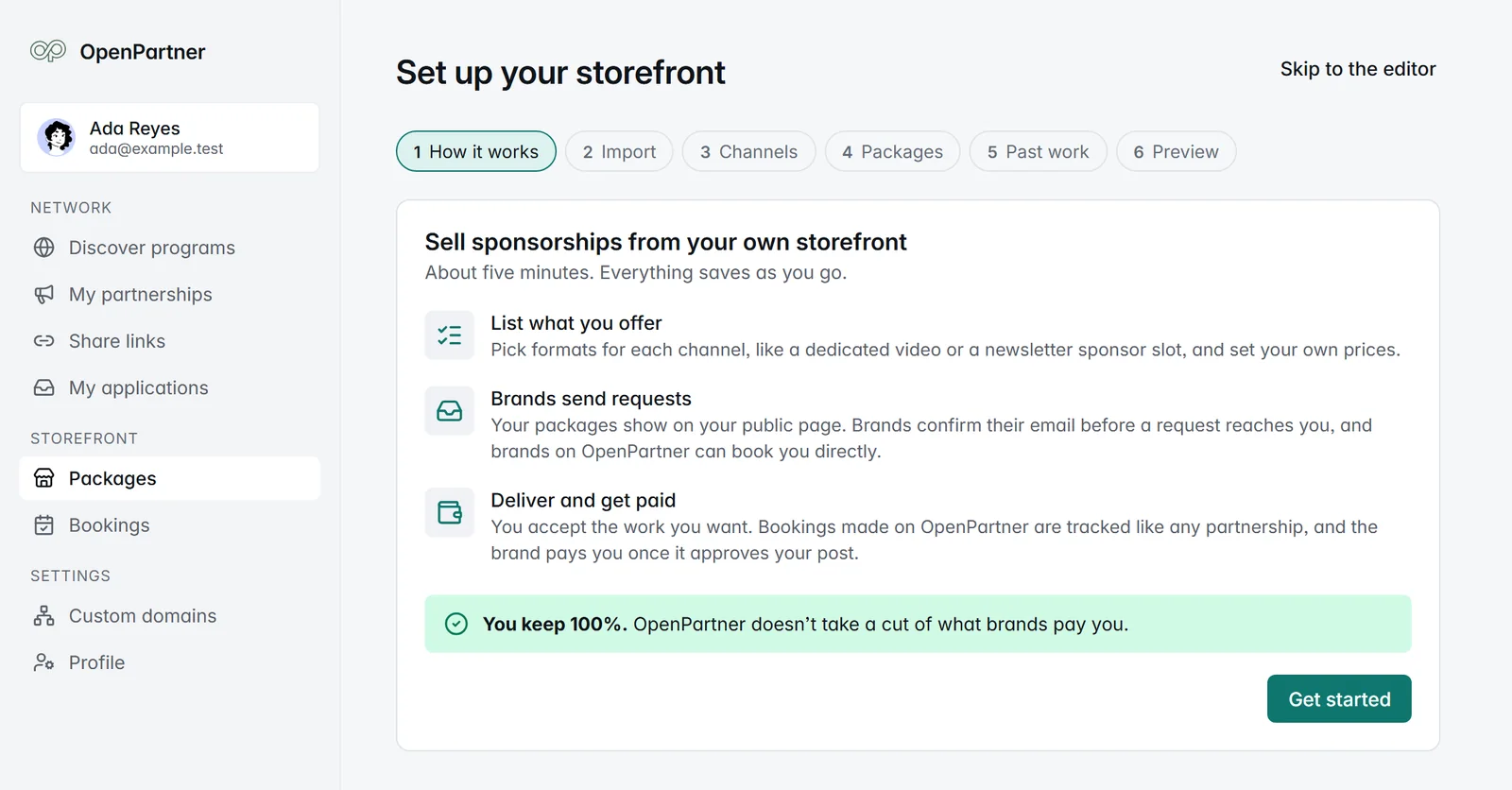
You can pause bookings any time. Your packages stay saved, and your storefront comes back as it was when you turn bookings on again.
Get started
- Creators: set up your free storefront.
- See one end to end: the storefront launch post walks through an example storefront, from the page a brand sees to the money landing in your earnings.
- Read the details: the storefront guide covers every limit and setting.
- Promoting brand programs on commission too? Here’s what to look for before you promote one.