
Passionfroot vs OpenPartner storefronts
Both give creators a free page to sell sponsorships from. They differ on the fee when the platform finds you the deal, when you get paid, what gets measured, and who gets listed. A creator's comparison, as of October 2026.
 Passionfroot
If you sell sponsored posts, videos or newsletter spots, you may already use Passionfroot. Like the creator storefronts we launched this month, it gives you a public page where brands see what you sell, at your prices, and book you from it.
This post compares them from the creator’s side: what each one costs you, how a booking turns into money, what each one measures, and who each one suits. Passionfroot is stronger in several places, and we say where.
Passionfroot details come from its public website and help centre, checked on 21 October 2026, plus TechCrunch's July 2026 report on its funding. Fees and features change, so check Passionfroot's current pages before you decide. OpenPartner details come from our storefront guide. Sources are listed at the end.
The short version
- Passionfroot is a sponsorship workspace with a curated B2B marketplace. It runs the whole deal, from booking to invoice to payment, and its network brings deals to the creators it approves. It takes no fee from you on deals you bring in yourself, and 15% on deals its network brings you.
- OpenPartner storefronts are a free rate card on your OpenPartner creator profile. Any brand can send you a request, and you settle it with them by email. Brands that run their partner program on OpenPartner can book you as a tracked deal: you post with a tracked link, and they pay you through their program once they approve the post. OpenPartner takes nothing from you, on either kind of booking.
At a glance
As of October 2026:
| Passionfroot | OpenPartner storefronts | |
|---|---|---|
| Cost to sign up | Free | Free |
| Fee on deals you bring in | None from you. The brand pays a fee on top: 5% in the help centre, 2% on the creator pricing page | None |
| Fee on deals the platform brings you | 15% of the deal, deducted from your payout, on every deal with that brand | None from you. On a tracked deal, any platform fee is billed to the brand |
| Marketplace listing | After a review for fit with B2B brands, once onboarding (including product prices) is done | Automatic once your profile is complete, bookings are on and a package is published |
| Stats on your page | Live stats from YouTube, Instagram, TikTok, Beehiiv, LinkedIn and X | Verified for YouTube. Other platforms are marked Self-reported |
| Price suggestions | Yes, for standard products | No |
| Page layout | Blocks you arrange, plus bookable dates for newsletters and podcasts | Fixed layout, packages grouped by channel |
| Getting paid | Inside Passionfroot, by card, bank transfer or the brand’s wallet. The brand can pay before you post | Requests: agreed and paid between you and the brand. Tracked deals: through the brand’s program, after it approves the post |
| Results | Post reports: views, engagement, impressions. Its brand pages also advertise spend and ROI | On tracked deals, the clicks, conversions and revenue from your tracked link, wherever you’ve shared it |
| Commissions | No. Flat-fee deals | Yes, on the same profile |
The rest of this post goes through each row.
What each one is
Passionfroot
Passionfroot is a Berlin company that runs a marketplace connecting B2B creators with brands. In July 2026 it raised a $15M Series A led by Insight Partners, and it says it has paid creators at least $10M in the 18 months before that. Its clients include Figma and Replit. For brands, it now leads with Zest, an AI agent that plans campaigns, suggests creators and drafts outreach.
For creators, Passionfroot is a workspace: a storefront (it calls it an intelligent media kit), a calendar, a requests inbox with chat, proposals, invoices, payments and post reports. Everything about a deal can happen inside it.
Its marketplace is curated. Every creator who signs up is reviewed for fit with its brands, which mostly sell to a business audience in technology and business. The review takes up to 48 business hours, or 7–10 business days at busy times. Approved profiles go live in the marketplace once the rest of onboarding is done, including prices on your products. Profiles set to Limited aren’t listed, but their storefront still works for requests they bring in themselves.
OpenPartner storefronts
A storefront is part of your OpenPartner creator profile, at
app.openpartner.dev/creators/<handle>. You list up to 12 packages, grouped by channel,
each with a fixed price, a “From” price or Price on request, in one of ten currencies.
Once your profile is complete, bookings are on and at least one package is published,
you’re listed in the creator marketplace. There’s no separate
application.
OpenPartner is also where brands run partner programs that pay commission. The same profile you use to promote those programs carries your storefront, so commissions and flat-fee posts sit side by side.
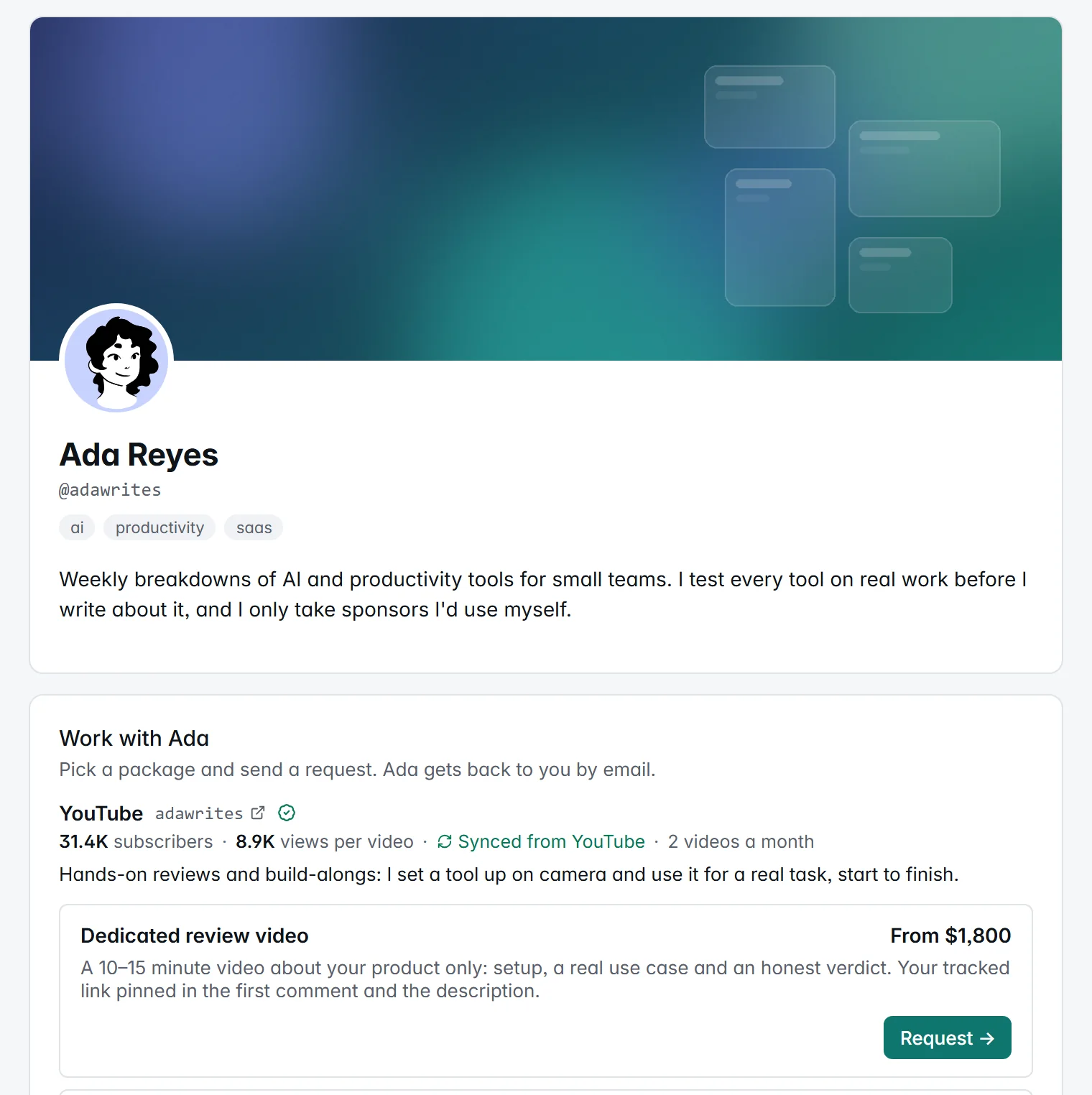
The storefront in the screenshots below is an example we set up with demo data. Ada Reyes and the brands that book her are made up.
Fees
Passionfroot
Passionfroot is free for creators, with no monthly fee. What it charges depends on who found the deal.
- Deals you bring in yourself, like bookings from your storefront link and proposals you send: Passionfroot takes nothing from you and charges the brand on top of your price. Its help centre puts that fee at 5% and says it mainly covers payment processing. Its creator pricing page says 2%. We couldn’t reconcile the two, so ask Passionfroot which applies to you.
- Deals its network brings you, like requests from its ad network and brands you connect with through its Discover tab: a 15% sourcing fee, including Stripe’s fees, is deducted from your payout. On a $1,000 booking, you receive $850. The fee applies to every collaboration with that brand, not only the first, and those deals carry a PF badge so you can tell them apart.
To keep getting network deals, Passionfroot asks you to keep payments on its platform. It says it tracks payments that go around it and ranks creators who stay on-platform higher in Discovery. If you’re paid by bank transfer, your bank’s intermediary fees and currency conversion can also reduce what lands.
On the brand side, brands can start free, and paid plans named Starter, Scale and Enterprise unlock features such as its FrootWallet. We couldn’t find prices for those plans on its website in October 2026.
OpenPartner
OpenPartner takes nothing from creators: no fee on packages, requests or bookings, and no cut of what brands pay you. On a tracked deal, any platform fee is billed to the brand, never taken out of your amount. A request you settle directly with a brand happens outside OpenPartner and carries no fee for either of you.
On deals you bring in yourself, the two are closer than the table makes them look. Passionfroot’s fee is paid by the brand, and it pays for invoicing and payment processing. OpenPartner charges nothing on a direct request, but it isn’t handling the money either: you agree payment with the brand yourself.
The real difference is on deals the platform brings you. Passionfroot takes 15% from you, on every deal with that brand. OpenPartner takes nothing from you.
How a booking becomes money
Passionfroot
- A brand picks a channel and product on your storefront, or sends a request, with a short brief.
- You accept or reject it. To get paid, you send the brand a proposal setting the product, date and price.
- Once the brand accepts the proposal, you request payment, or the payment link goes out automatically. You set the payment terms, due date and VAT, and Passionfroot generates the invoice.
- The brand pays by card through Stripe, by Passionfroot Bank Transfer or from its FrootWallet, and its choice decides how you’re paid out. Card payments reach your Stripe account and then your bank on Stripe’s payout schedule. Bank transfers are invoiced in USD, paid out in USD, EUR or GBP, and typically land 3–5 business days after the brand pays.
- After you post, Passionfroot asks for the link and pulls in the post’s metrics.
Payment is requested when the brand accepts your proposal, not after you post, so a brand can pay you before you publish. That’s a real advantage. Who you invoice depends on how the brand pays: for a card payment you invoice the brand, and for a bank transfer or wallet payment Passionfroot is the merchant of record and you invoice Passionfroot. Card payments need a Stripe account. Where Stripe isn’t available, India for example, you can still be paid by brands that pay by bank transfer.
OpenPartner
A request from anyone. A brand picks a package (or Get in touch for something custom), fills in a short form and confirms its email. You accept or decline with an optional note. When you accept, the email’s Reply-To is your address, so the conversation moves to your inbox, and you agree the details and payment between you. OpenPartner isn’t part of the payment.
A tracked deal from a brand on OpenPartner. The brand books you from its dashboard for an agreed amount.
- Accept. You become the brand’s partner on that program, with a tracked link.
- Post and deliver. Put the tracked link in the post. When it’s live, paste up to five links to the published content and mark it delivered.
- The brand reviews. For YouTube videos and pages on your own website, it sees checks for whether the post is on your verified account, includes your tracked link and went up after you accepted. On every platform, it sees the clicks your link has had since you delivered. The checks never block approval.
- The brand approves. The amount is added to your earnings with that brand as a bonus and paid out with its next payout run, the same way it pays commissions.
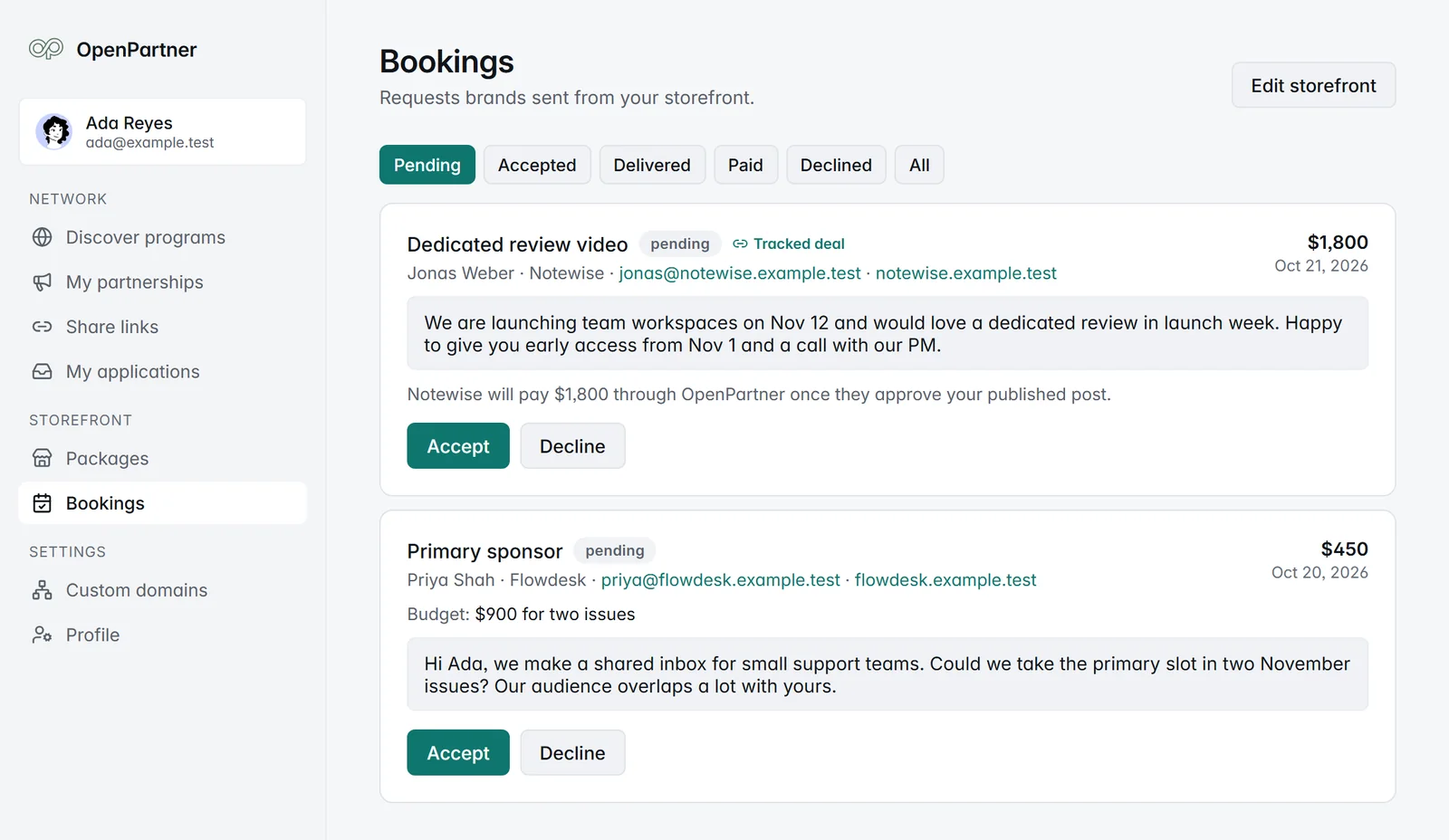
The trade-off is timing. On a tracked deal you’re paid after the brand approves the post, on the brand’s payout schedule, not before you post. OpenPartner doesn’t offer upfront payment. If being paid before you publish matters to you, Passionfroot is ahead here.
The payment runs through the brand’s partner program, which accepting the booking joins you to if you aren’t a partner already. There’s no separate invoice, and the brand pays you the same way it pays its other partners.
What gets measured
Passionfroot
- Live stats on your storefront for YouTube, Instagram, TikTok, Beehiiv, LinkedIn and X. They refresh about every two weeks (Beehiiv every 24 hours). Substack isn’t supported for live stats any more, so Substack numbers are entered by hand.
- Price suggestions for standard products on supported channels with stats.
- Post reports. The day after a sponsored post goes live, you’re asked for its link. Passionfroot pulls in public metrics like views, likes and comments, refreshes them daily, and asks you for private ones like reach and impressions. Connected LinkedIn accounts get verified impressions. Skipping report requests lowers your response rate, which can cost you visibility with brands.
Its brand-facing pages also mention seeing ROI per creator and post. We didn’t find a description of how that’s calculated in its public docs.
OpenPartner
- Verified YouTube stats. A verified YouTube channel shows its subscriber count and median views per video, synced from YouTube. Other platforms are marked Self-reported, so brands can tell the difference.
- Results from your tracked link. On a tracked deal, the clicks, conversions and revenue from your tracked link are recorded against your partnership. The brand sees them, and so do you, on that program’s page in your dashboard. The totals include anywhere else you’ve shared the same link, so they’re your results with that brand, not one post’s in isolation. The next time you pitch, you’re quoting results, not only views.
- The partnership outlives the booking. Your tracked link keeps working on the program’s usual terms. If the brand pays commission, sales your post drives later still earn you commission.
Passionfroot measures more platforms out of the box, and its live stats cover five more than ours. OpenPartner measures what your tracked link drove, but only on tracked deals: a request you settle by email isn’t tracked.
The page itself
Passionfroot’s storefront editor is built from blocks: channel blocks, sponsorship blocks, link blocks and content blocks, so you can add case studies, references or anything else you want brands to read. Newsletters and podcasts can publish dated slots, with a set number of ad placements per slot, so a brand books a specific issue. Packages can bundle several products, across channels, at a discount.
An OpenPartner storefront has a fixed layout: your cover and bio, then Work with <your first name>, with each channel’s handle, audience, cadence and pitch above its packages, then Across channels for bundles, Get in touch for custom requests, and your audience, sample work and past collaborations. Templates fill in the wording for each platform’s common formats, and the editor shows a live preview. There are no extra blocks, and packages aren’t tied to dates: timing is something you agree with the brand.
Getting found
Passionfroot’s marketplace is its strongest feature for creators who get in. Approved creators can be found by brands searching its network, including through Zest, and its Discover tab lists live campaigns from brands looking for creators plus a directory of brands open to a pitch, with five connects a week. Discover needs an approved profile and a connected Stripe account, and you only see campaigns that match your content categories. If you’re a B2B creator and you’re approved, that’s a real source of inbound deals, with brands like Figma and Replit on the other side.
If your audience isn’t a business audience, the review may set your profile to Limited. Your storefront still works, but you’re not in the marketplace.
OpenPartner’s creator marketplace lists your storefront as soon as the three conditions above are true. Brands filter by platform, show only verified creators, or search, and storefronts with the most recently updated packages come first. To be plain about where we are: storefronts launched in October 2026, the marketplace is new, and tracked deals only come from brands that run their program on OpenPartner. Passionfroot’s network is established.
Which one suits you
Passionfroot is the better fit if:
- You’re a B2B creator in tech, software, AI or business, you want inbound deals from an established network, and 15% on those deals is worth it to you.
- You sell dated inventory, like newsletter issues or podcast episodes, and want brands to book a specific slot.
- You want invoicing and payment in one place, with the payment terms and VAT you set on each invoice, and you want to be paid before you post.
- You want live stats from Instagram, TikTok, LinkedIn, X or Beehiiv on your page, or price suggestions.
An OpenPartner storefront suits you if:
- You promote brand programs on commission, or want to, and want flat-fee posts on the same profile.
- You want the clicks, conversions and revenue from your tracked link on record for your next pitch, not only views.
- You don’t want a platform taking a cut of your fee, including on deals it brings you.
- Your audience isn’t B2B, so a B2B-curated marketplace may not list you.
You can run both
Nothing stops you having both. Keep Passionfroot for the deals its network brings you, and use an OpenPartner storefront for tracked deals and commissions.
One thing to respect: Passionfroot’s 15% covers every collaboration with a brand its network brought you, and it asks you to keep those payments on its platform. If a brand found you through Passionfroot, keep that relationship there.
Bringing your Passionfroot storefront over
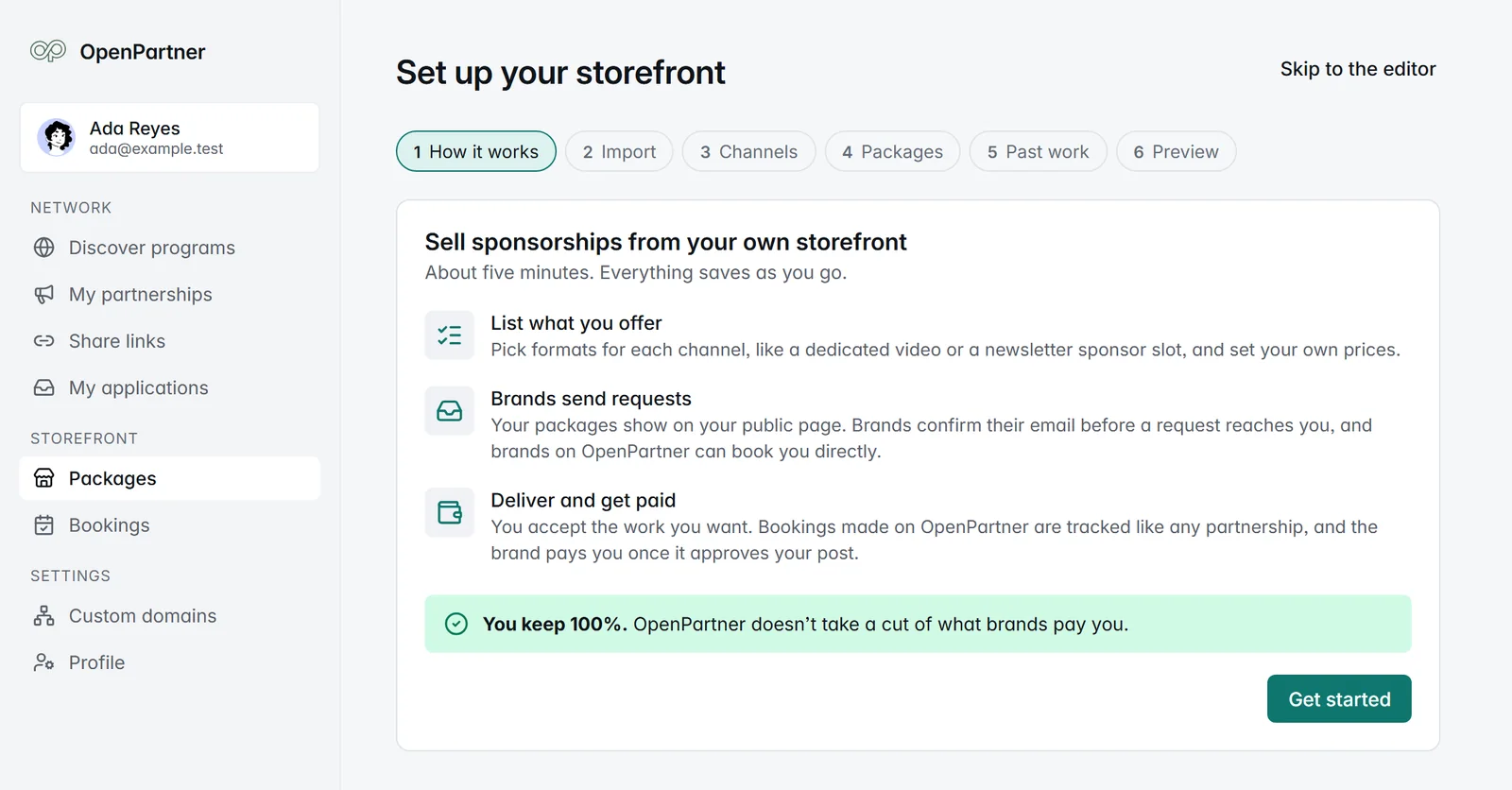
You don’t have to retype anything. Step two of Guided setup is an optional import from Passionfroot: paste your Passionfroot page, and we bring over your channels, packages and past collaborations. We only read your public page, nothing is saved until you choose what to import, and packages come in as drafts so you can check them before they go live. Your bookings, conversations and payouts stay in Passionfroot, behind your login there.
Get started
- Creators: set up your storefront. It’s free, and you can pause it any time.
- See it end to end: the launch walkthrough follows an example storefront from the page a brand sees to the money landing.
- Read the details: the storefront guide covers every limit and setting.
Sources
Passionfroot pages, checked 21 October 2026:
- Creator pricing
- For creators and the homepage
- Help centre: Pricing, FAQs, Day 1 with Passionfroot, Storefront, The collaboration flow, Your first booking, Getting paid, Paying creators, Reports, Discover, The creator vetting process
- TechCrunch, Passionfroot raises $15M to expand its B2B creator marketplace to the US, 22 July 2026