How to book creators with tracked links (and pay only for posts you approve)
A flat-fee sponsored post usually means paying up front and guessing what it drove. On OpenPartner you book a creator's package from your dashboard, they post with a tracked link into your program, and you pay through your program only after you've approved the post. A step-by-step walkthrough for brands.
Plenty of creators don’t want an affiliate link. They sell a sponsored post, a dedicated video or a newsletter slot for a flat fee. Buying one usually takes a week of email, an invoice you pay up front, and a post with a UTM link if you remembered to ask for one. Then you go through your analytics trying to work out whether it did anything, and the next negotiation starts from follower counts again.
Creator storefronts give creators a public rate card. This post is the brand side: how to book one of those packages as a tracked deal. The creator joins your program with a tracked link, posts, and sends you the links. You review the post, with automatic checks to help, and pay through your program only once you’ve approved it.
The screenshots show the OpenPartner dashboard with demo data. Notewise, its admin and the creators are made up.
What you need first
- Your partner program on OpenPartner, with a plan. Bookings work on the hosted Flex and Revshare plans. A booked creator becomes one of your partners, so, as with adding any partner, you need to have picked a plan.
- A connection to the OpenPartner Network. On a hosted plan it’s one click under Network → Get connected, and Network access is included in the plan.
- A program listed on the marketplace. The creator’s tracked link points at it. A program is listed while its marketplace toggle is on, which is the default for new programs once you’re connected. A private program you keep off the marketplace can’t be used for a booking.
- An approved account. New brand accounts are reviewed before they can bring partners in or pay them, and that includes bookings.
Self-hosted instances can book too, once they’re connected to the Network. There the Network access plan applies instead of the booking fee below.
1. Find a creator
There are two places to look:
- The creator marketplace lists creators who are taking bookings and have at least one package published, with their first three packages and prices on each card. You can filter by platform, show only verified creators, or search. Anyone can browse it, signed in or not.
- Network → Discover creators in your dashboard lists creators on the Network with more filters: categories, platforms, audience location, total followers and verified accounts. Each card has View profile, Invite and Book.
Found someone on the public marketplace? Search for their name or handle under Discover creators to book them.
Read the storefront before you book. Each channel shows its audience size, how often the creator publishes, and what each package includes. Numbers read from a verified YouTube channel, its subscriber count and median views per video, say Synced from YouTube. A count the creator entered themselves is labelled Self-reported, so you can tell which is which.
2. Book a package
Click Book on the creator’s card.
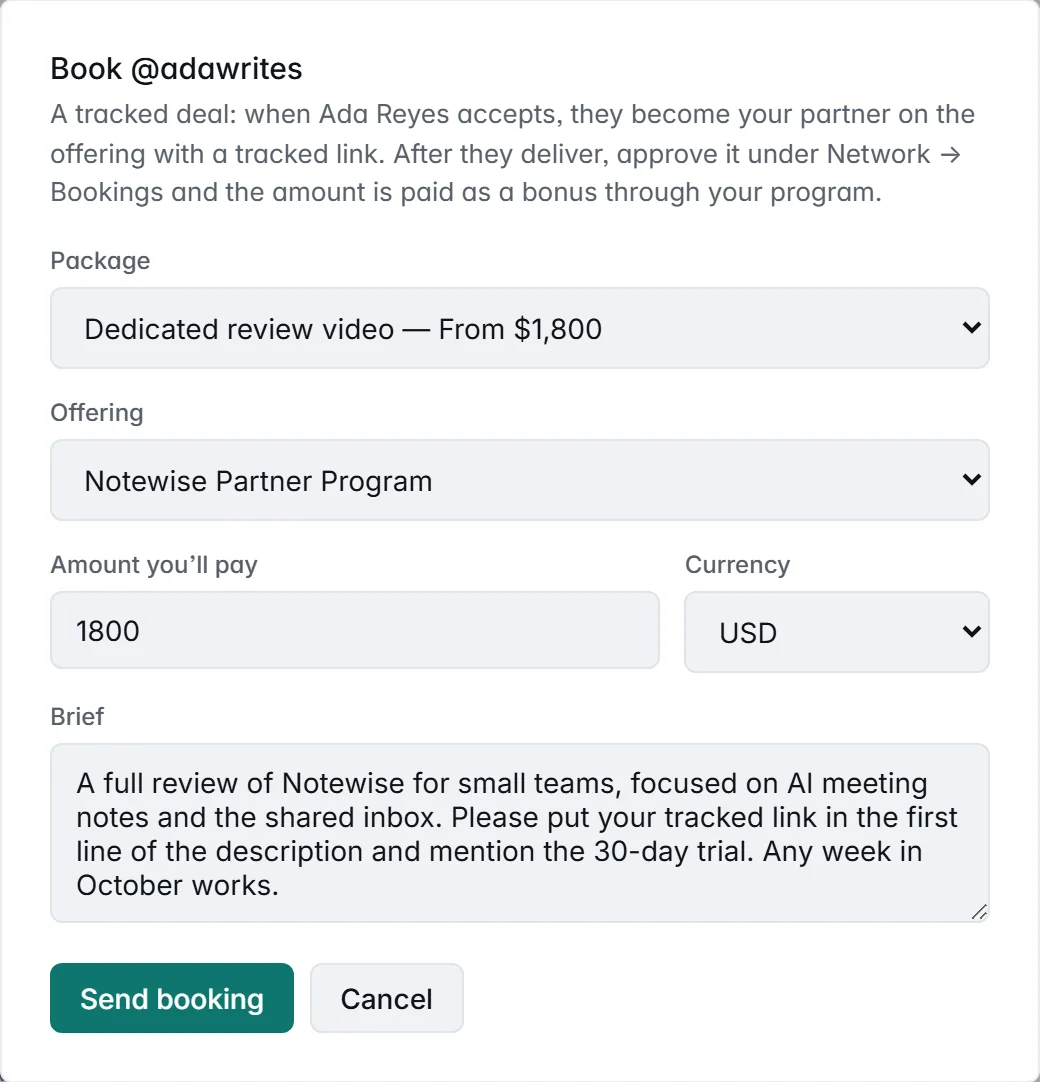
- Package. One of the creator’s packages, or Custom collaboration for something that isn’t on their list.
- Offering. The program the creator joins. The form calls it an offering because that’s the program’s marketplace listing. The creator’s tracked link points at it, and its terms apply to whatever they drive after the booking.
- Amount you’ll pay and Currency. Picking a package fills in its price as a starting point, and you can change it. It’s a whole number, with no cents, and it’s the amount the creator earns, in full, when you approve.
- Brief. 20 to 2,000 characters on what you want.
Send booking puts it in the creator’s bookings inbox with the agreed amount, marked as a tracked deal, and emails them. There’s no email confirmation on your side, because you’re signed in.
A brief that’s easy to approve later covers:
- Where the tracked link goes, such as the first line of a YouTube description. Ask for the full link, not a shortened one, so the checks in step 4 can find it.
- What the post must cover, and anything it mustn’t.
- Timing, as a window if you can.
- Anything else you’ve agreed, like how the sponsorship is disclosed, how long the post stays up, or whether you can reuse the content in ads. The booking only records the brief, the amount and the delivered links.
A few limits:
- There’s no counter-offer. The creator accepts or declines, with a note. If the price says “From” or “Price on request”, or you’d rather agree the details first, send a request from their public page. If they accept it, replying to the acceptance email reaches them directly, so you can settle the details there, then book the agreed amount.
- Three open bookings with one creator at a time.
- A one-time re-authorization for some older Network connections. If the form asks you to Re-authorize, it’s asking for permission to record the creator’s payment in your program. Click it once, then send the booking again.
3. The creator accepts and posts
When the creator accepts, they become your partner on that program, with a tracked link, as if you’d approved their application. If they already partner with you on that program, the booking uses that partnership. Either way, they’re in your partner list like anyone else, and clicks, signups and revenue through their link are attributed under the program’s rules.
Until they deliver, you can cancel the booking from Network → Bookings, and the creator is told.
When the post is live, the creator clicks Deliver and pastes up to five links to the published content. You get an email, and the booking moves to To review.
4. Review the delivery
Every delivered link is checked, and the results show as badges on the booking in Network → Bookings.
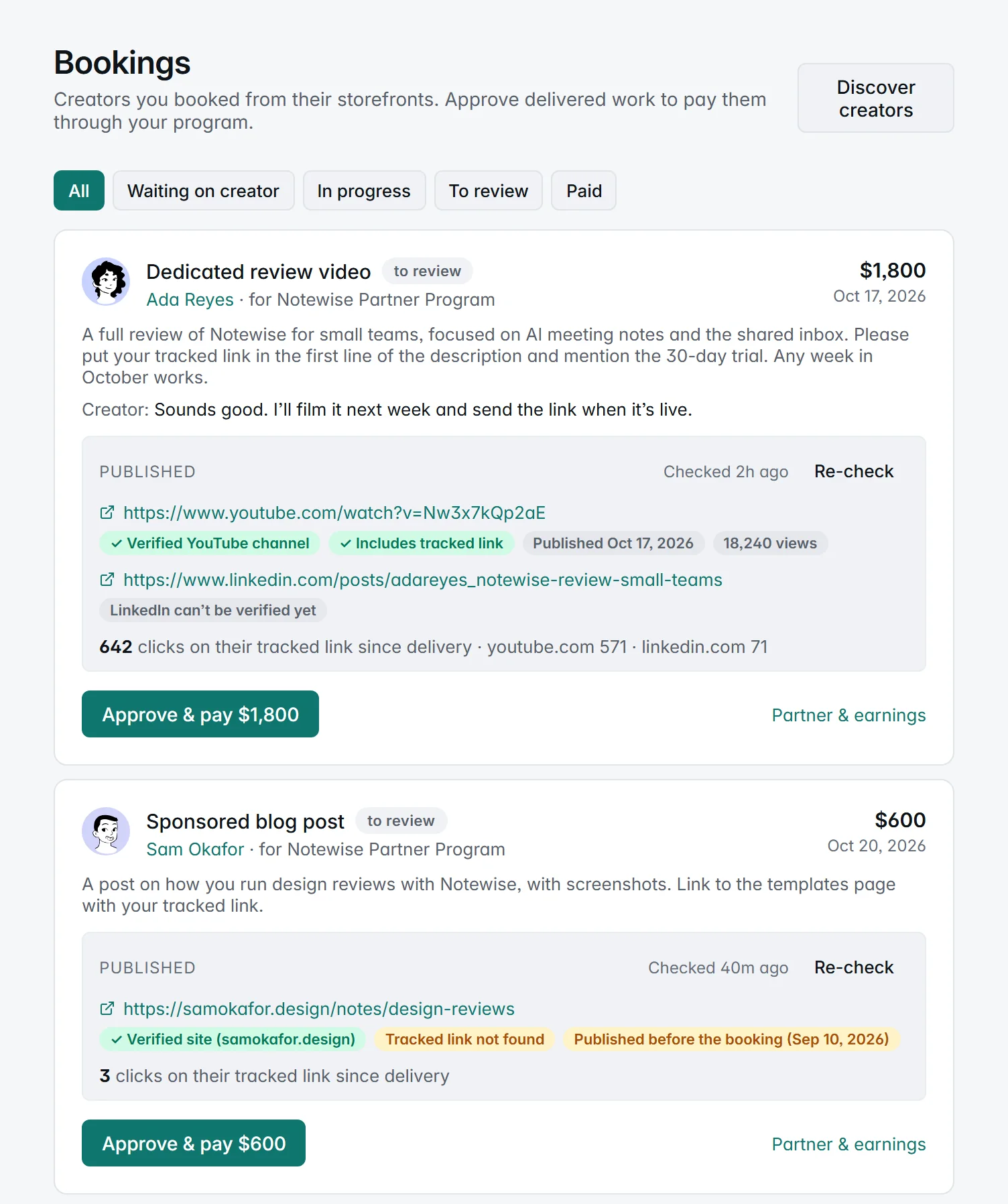
What’s checked depends on where the post is.
- YouTube. Whether the video is on the creator’s verified channel (a video on a different channel is flagged), whether the description includes their tracked link, when it was published, and its view count.
- The creator’s own website. Whether the page is on a domain they’ve verified, whether it includes their tracked link, and when it was published, if the page says.
- LinkedIn, X, TikTok, Instagram and other social platforms. Not checked yet: they sit behind logins, and we don’t scrape them. Open the post and look for yourself.
On every platform, including LinkedIn and the rest, you also see:
- Clicks since delivery on the creator’s tracked link, with the top referring sites. These come from your own click data, not from the platform.
- Reused posts. A link that was already delivered for another booking is flagged, whether that booking was yours or another brand’s.
Reading the warnings:
- Published before the booking means the post went up more than a day before the creator accepted. It might be an older post repurposed for your booking. Check that it’s what you asked for.
- Tracked link not found can mean the creator used a link shortener, which hides the link from the check. Open the post and look.
Checks run right after delivery and again every six hours while the booking waits for you, so the click count stays current while you decide. Re-check runs them on demand, at most once a minute.
The checks inform; they never block. You can approve a delivery with a warning on it, and clean badges don’t approve anything for you. They also can’t tell you whether the post follows your brief: watch or read it before you approve.
A delivery you don’t approve stays in To review, and nothing is paid. There’s no reject step, so if something needs fixing, raise it with the creator before you approve. They’re one of your partners by now.
5. Approve and pay
Click Approve & pay and confirm. The agreed amount is recorded in your program as a bonus to the creator, under the program you booked them for. Your approval is the review, so the bonus is approved straight away rather than waiting out the program’s holding period. From there it’s handled like any approved commission: it joins your next payout run, subject to your payout minimum and to any refund clawbacks on that creator’s account.
The booking shows paid once the bonus is recorded, and the creator gets an email. That means it’s on your ledger. The money moves the way your payouts always do: on hosted OpenPartner, you send it yourself, by PayPal, bank transfer or however you pay partners, and mark the payout paid. OpenPartner never holds the money.
If the bonus can’t be recorded, for example because you’ve revoked that partner, the booking shows payment failed with the reason. Fix the cause and click Retry payment.
What it costs
Creator bookings are billed like a bounty. In the words of the pricing page: the fee is “10% of it on Revshare or 5% on Flex: $50 on a $500 sponsored post on Revshare.”
For Ada’s $1,800 video, that’s $180 on Revshare, or $90 on Flex, on top of the $49 monthly base you already pay there.
- It’s billed to you, on your OpenPartner invoice. It never comes out of the creator’s payment: Ada earns the full $1,800.
- No booking fee until you approve. A booking that’s declined, cancelled or never approved carries no booking fee. Your plan and the fees on ordinary partner conversions apply as usual.
- Later sales through the creator’s link are billed like any partner’s conversions, under the usual platform fee.
- A request you settle with a creator directly, outside OpenPartner, carries no fee. It also carries no tracked link, unless you set one up.
These are the current standard rates. If your plan started before the current fee rule, or you’re on a contract, your own terms apply: see Billing.
After the post
From the moment the creator accepts, Partner & earnings on the booking opens their partner page. Clicks, conversions and revenue from their tracked link are there, and in the same reports as every other partner. When you’re deciding whether to book them again, start from those numbers, not their follower count.
The partnership doesn’t end with the booking. The creator’s tracked link keeps working on the program’s usual terms, so if your program pays commission, sales the post drives next month earn the creator commission too. Factor that into what you offer: you’re paying a flat fee for the post plus commission on what it sells. It also gives the creator a reason to keep the link in the post.
When a tracked booking isn’t the right fit
- The creator wants paying up front. Tracked bookings pay after you approve, never before. A creator who needs a deposit has to agree that with you directly.
- The post lives on Instagram or TikTok. The checks can’t look inside those platforms yet, so you review the post yourself. The clicks still come through.
- You need a contract. A booking records the brief, the amount and the delivery. For exclusivity, usage rights or anything a lawyer would want, sign a separate agreement and reference it in the brief.
Get started
- Find creators: browse the creator marketplace, or open Network → Discover creators in your dashboard.
- Not on OpenPartner yet? Start free, connect to the Network, and list a program.
- What creators see: the storefronts launch post walks through the same booking from the creator’s side.